Published on: Mon 27-Oct-2025 09:20 AM
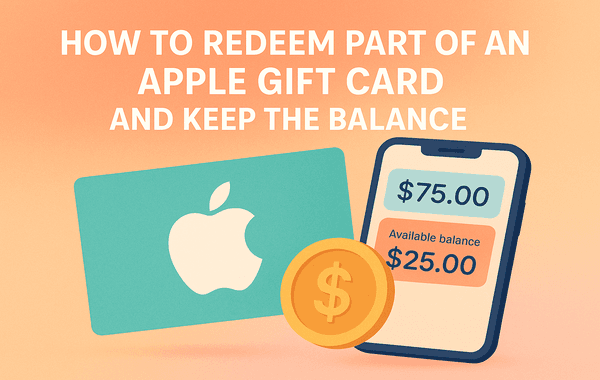
When you receive an Apple Gift Card, you don’t always have to use the full balance at once. Whether you’re buying apps, subscribing to Apple Music, or renting a movie, Apple allows you to redeem part of an Apple Gift Card and keep the remaining balance for future purchases. Many users don’t realise this flexibility exists — and end up redeeming the entire amount unnecessarily.
In this guide, we’ll show you how to redeem part of an Apple Gift Card, how to check and manage your balance, and the smart ways to stretch its value over multiple transactions. If you haven’t purchased your Apple Gift Card yet, you can get one instantly from Gyftwala — your trusted platform for authentic and discounted digital gift cards.
The Apple Gift Card is a versatile payment method that can be used across Apple’s digital ecosystem — including the App Store, iTunes, Apple Music, Apple TV, and Apple Books. It can also be used for hardware purchases on the official Apple Store.
When you redeem an Apple Gift Card, the balance is added to your Apple ID account, from which future purchases are automatically deducted. However, what many users don’t know is that you can redeem a partial amount or spend gradually without exhausting the entire card value.
For example, if your Apple Gift Card has a $100 value and you buy an app worth $4.99, only that amount will be deducted. The remaining $95.01 stays securely in your Apple ID balance until your next purchase.
Technically, Apple doesn’t allow you to redeem just “a portion” of the code. When you redeem the Apple Gift Card code, the full amount is transferred to your Apple ID. However, you don’t need to spend it all at once.
Here’s the distinction:
So, while the full card value is redeemed to your Apple account, you have complete control over how much of it you spend and when you use it.
On your iPhone, iPad, or Mac, open the App Store, Apple Music, or iTunes app.
Make sure you’re signed in to the same Apple ID that you use for all your Apple services.
At the top-right corner, tap your profile photo or initials to access your account settings.
Choose the “Redeem Gift Card or Code” option. You can either scan the card using your camera or enter the 16-digit code manually.
Once confirmed, the total amount of the Apple Gift Card will be added to your Apple ID balance. You can now use it gradually for any purchases across Apple’s ecosystem.
Tracking your remaining balance ensures you never lose track of your unused funds. Here’s how to check it:
Your Apple ID balance automatically updates after every transaction, reflecting your current available amount.
No, Apple currently doesn’t allow transferring partial balances between Apple IDs. Once redeemed, the amount stays tied to that Apple account. However, if you want to share part of the value, you can gift a new Apple Gift Card to another person.
If you often make multiple Apple purchases or want to manage spending across family accounts, it’s smarter to buy smaller denomination Apple Gift Cards (like $10 or $25) instead of one large one. You can conveniently bulk buy such cards at Gyftwala to manage gifting or personal budgeting.
Using your balance wisely ensures you get maximum value out of your Apple Gift Card. Here are some smart tips:
Apple Music, iCloud, and Apple TV+ subscriptions automatically draw from your balance before charging your linked payment method.
Whether it’s productivity tools or mobile games, use your Apple balance to buy in-app features and content securely.
Access the latest entertainment without entering card details — everything deducts from your balance.
If your Apple Gift Card balance doesn’t cover a purchase fully, Apple will automatically use your credit/debit card for the remaining amount.
Occasionally, platforms like Gyftwala offer exclusive discounts or cashback on Apple Gift Card purchases. Buying cards during these promotions lets you save money while keeping funds ready for future Apple purchases.
Keeping a portion of your Apple Gift Card balance offers flexibility and control.
This approach is ideal for users who make frequent micro-transactions or subscribe to Apple services.
Learning how to redeem part of an Apple Gift Card and keep the balance helps you make the most out of every dollar. Instead of rushing to spend the full amount, you can strategically use it for subscriptions, app upgrades, or entertainment over time. With secure and region-specific cards available instantly, platforms like Gyftwala make managing your Apple purchases simpler than ever.
If you’re ready to make the most of your Apple ecosystem, get your Apple Gift Card from Gyftwala today. Whether you want to buy, gift, or bulk purchase, Gyftwala offers instant delivery, verified authenticity, and competitive discounts you won’t find elsewhere. Visit gyftwala.com now and unlock smarter, safer, and more flexible Apple spending.
How to Choose the Best Chamet Diamonds Pack for VIP and Gifts
Tips to Buy Google Play USD Cards Without Any Delay

Steam Wallet Gift Card Buyer’s Guide for Safe and Fast Top-Up

Buy Google Play USD Gift Cards with Instant Delivery in India
How to Purchase Roblox USD Gift Cards Safely via UPI (Complete 2026 Guide)
Google Play Gift Card (USD) Benefits: Instant Top-Ups Across Multiple Apps & Games

Chamet Diamonds Top-Up Guide: Boost Your Live Gifts and Ranking
Honkai Star Rail Top-Up FAQ: Common Questions on UID and Payments India
Google Play (USD) Gift Card Best Deals: Compare Prices with UPI Discounts

Everything About Poppo Live Coins (Global) Top-Up Rates and Safe Methods
