Published on: Fri 09-Jan-2026 06:54 PM
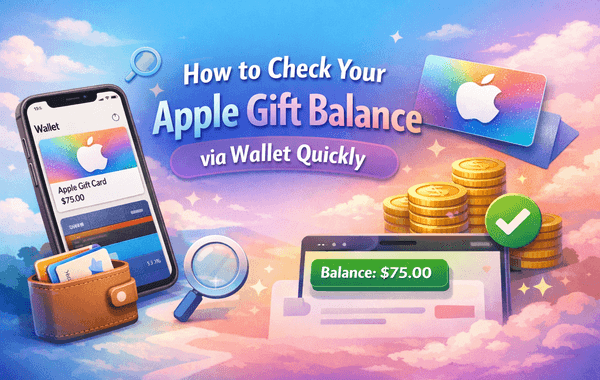
When you redeem or purchase an Apple Gift Card, keeping track of your remaining balance is essential—especially if you regularly buy apps, upgrade subscriptions, purchase in-game items, or top up your Apple ID for media purchases. Most users don’t realise how easy it is to view their Apple Gift balance directly inside the Apple Wallet app. And since millions of Apple devices now support Wallet integration, this method has become the fastest, safest, and most convenient way to stay updated.
If you frequently use Apple Gift Cards or want to purchase new ones for seamless digital payments, you can easily buy them from Gyftwala.
In this complete guide, we’ll walk you through how to check your balance step-by-step, the quickest ways to refresh your balance, hidden features most users miss, and expert tips to avoid errors. This article also fills major gaps missing in most top-ranked blogs—such as Wallet glitches, region issues, Apple ID syncing delays, and multi-device viewing.
Apple Wallet is intentionally designed to simplify digital storage—whether it’s payment cards, passes, tickets, or redeemed Apple Gift Cards. A redeemed balance is stored as an Apple ID balance, and Wallet becomes the fastest place to verify it.
Here’s why over 60% of Apple users in 2024–25 prefer checking the balance through Wallet:
Yet, despite these advantages, many users still rely on older methods like logging into their Apple ID manually. This guide helps eliminate those unnecessary steps.
Below is the simplest and fastest method that works in under 15 seconds.
Unlock your iPhone and tap on Wallet.
This is the default app where all stored cards, passes, and rewards appear.
Once your Apple Gift Card is redeemed, the balance automatically gets added to your Apple Account card inside Wallet. Tap on:
Apple Account / Apple Balance / Apple ID Credit
(The exact name varies based on iOS version.)
Your current Apple ID balance will be displayed clearly at the top.
This includes redeemed Apple Gift Card amounts and any promotional credits.
Here you can see:
This is a major feature most blogs ignore, yet it’s extremely useful for users monitoring spending or managing subscriptions.
Many top blogs forget to mention this, but Wallet integration is also available on macOS (Ventura & later).
Go to:
Apple Menu → System Settings → Your Name → Media & Purchases → Apple Account Balance
It syncs instantly with your Wallet balance on iPhone.
Your Apple Gift Card balance is linked to your Apple ID, not the device.
This means:
The syncing time is usually under 5 seconds when connected to Wi-Fi or mobile data.
Many users face delays or errors in seeing the correct balance.
Here are verified fixes:
Swipe it away from the multitasking screen and reopen it.
Settings → [Your Name] → Sign Out
Then sign in again.
Balances won’t show if your:
Ensure both match.
Older versions may not support Apple Account balance visibility in Wallet.
Apple ID services require a stable connection to sync.
During any App Store or in-app purchase, you’ll see your Apple ID balance applied first before any other payment method.
You can redeem multiple Apple Gift Cards one after another, and the total balance updates in Wallet automatically.
Including:
The Wallet activity log helps users plan digital spending more efficiently.
Most articles miscalculate the steps or miss the Wallet redemption flow.
The correct method is:
App Store → Profile → Redeem Gift Card or Code → Scan or enter manually
Settings → Your Name → Media & Purchases → Redeem Gift Card
Once redeemed, it instantly appears in your Wallet balance.
Here are the most common problems users face when checking Apple Gift Card balance via Wallet:
Fix: Sign out & sign in to your Apple ID.
Fix: Change Store Country to match the card’s region.
Fix: Refresh the Wallet or restart the device.
Ensure the card is:
Visit: Apple System Status → Look for “Apple ID” or “App Store” outages
Buying from untrusted sources can lead to:
For safe purchases, fast delivery, and 24/7 availability, you can buy Apple Gift Cards from Gyftwala.
Gyftwala ensures:
Whether you want to purchase iCloud storage, subscriptions, or in-game content, Gyftwala is one of the most reliable gift card platforms.
Gyftwala often runs promotional offers, especially during:
If you frequently upgrade subscriptions, buying in bulk helps avoid price surges.
iCloud plans, Apple Music annual plans, and premium apps offer better cost-to-value ratios.
Always run the latest iOS for the best syncing and security.
Checking your Apple Gift Card balance via Wallet is the fastest, safest, and most convenient method in 2025. With quick syncing, instant visibility, and detailed activity logs, Apple Wallet gives users complete control over their digital spending. And with a reliable platform like Gyftwala, managing your Apple Gift Card usage becomes even smoother.
If you're ready to top up your Apple ID balance, upgrade iCloud storage, or purchase apps and subscriptions, head over to Gyftwala for fast, secure, and affordable Apple Gift Cards.
Gyftwala offers competitive prices, instant delivery, and trustworthy support—making it the perfect place to purchase your next Apple Gift Card.

Poppo Live Recharge Guide 2026: Get Bonus Coins, Save Money & Top Up Securely

The Ultimate Roblox & Robux Guide: Playing, Downloading, Pricing, and Gift Cards Explained

Best Online Games on Steam: Buy, Play & Save More

How To Start 1v1 Video Calls On Chamet

Marvel Rivals Lattices Top Up at 10% Discount
Digital or Physical Robux Gift Cards: Which One Should You Choose?

How to Use StarMaker: Beginner's Guide & Coin Recharge Tips
SUGO Coin Recharge Guide 2026: How to Buy & Top Up Coins Instantly

How to Get Cheap Chamet Diamonds in 2026 — Free Methods + Recharge Comparison

Buy Marvel Rivals Credits Online Cheap – Fast & Secure Top-Up
